You set up HubSpot once, build the obvious workflows, and move on. New form submission goes to sales. New deal triggers a Slack ping. Done, box checked.
Except that’s the bare minimum. The business changes along the way (new hires, new pricing, a bigger pipeline) but nobody goes back and rebuilds the workflows to match.
You might be unknowingly costing yourself both pipeline and revenue.
Here are three workflows most teams forget – and what not having them actually costs.
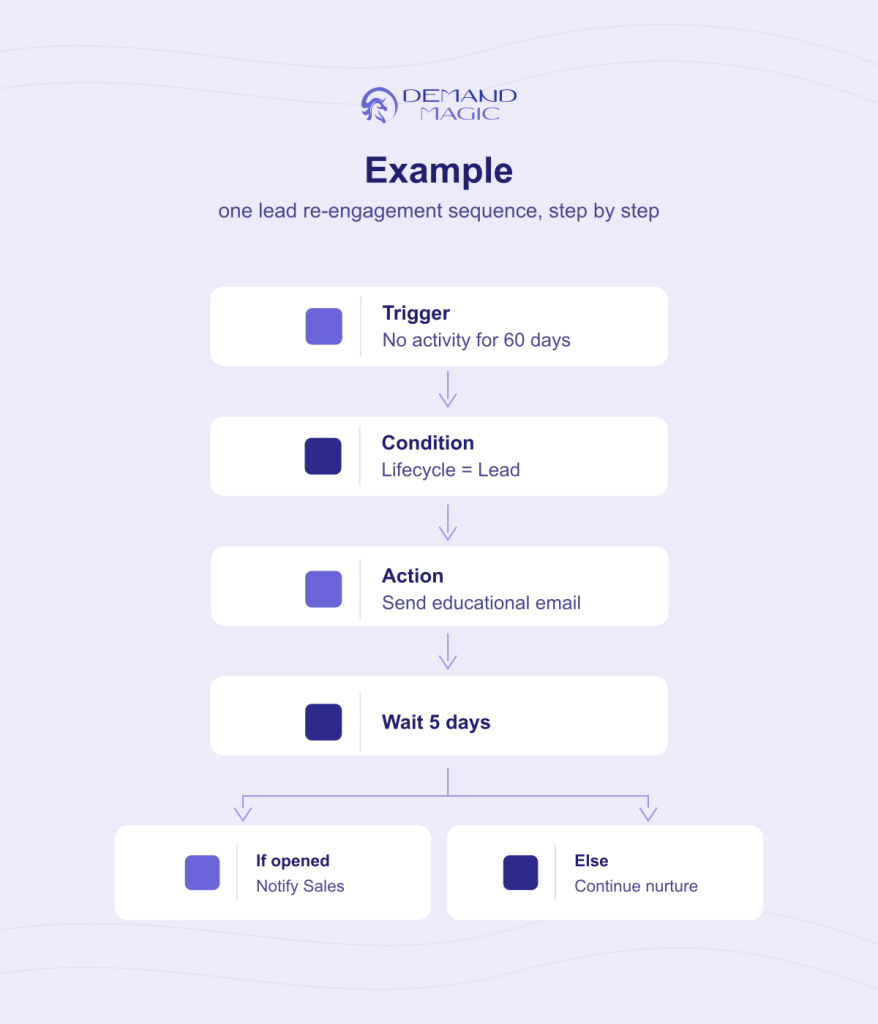
Automatically flags and re-engages contacts who went quiet:
no email opens,
no site visits,
no activity for 30, 60, 90 days.
Instead of letting them sit untouched in a list forever.
It feels like a “later” problem.
Nobody wants to build automation for leads that already look dead.
A huge chunk of your database.
Buyers don’t disappear because they lost interest – they disappear because the timing was wrong.
A prospect who went quiet in month one might be ready to buy in month six, but if nothing in your system notices, nothing brings them back.
You paid to acquire that lead. Letting it rot is the most expensive kind of inaction there is.
Contacts that get properly re-nurtured don’t just come back but they buy more! Based on SQ 2026 Statistics, Automated lead nurturing increases purchase rates by 47%. Re-engagement isn’t just about recovering a lead, it’s about recovering a better one.
Rebuilding workflows to match how the business runs today isn’t optional; it’s where the industry is heading anyway.
Gartner’s May 2026 survey of 402 CMOs found marketing leaders expect AI-driven automation of marketing work to more than double, from 16% in 2026 to 36% by 2028. Teams that already have their core workflows rebuilt are the ones positioned to capture that shift, not scrambling to catch up to it.
Salesforce’s own research backs up why this matters more than ever: business buyers now expect real-time engagement, and a slow or absent follow-up directly damages loyalty toward a brand — not just conversion on that one deal.

Goal: resurface cold contacts with new content, catch renewed activity the moment it happens, and re-route anyone who engages back to sales: automatically, with zero manual list-scrubbing.
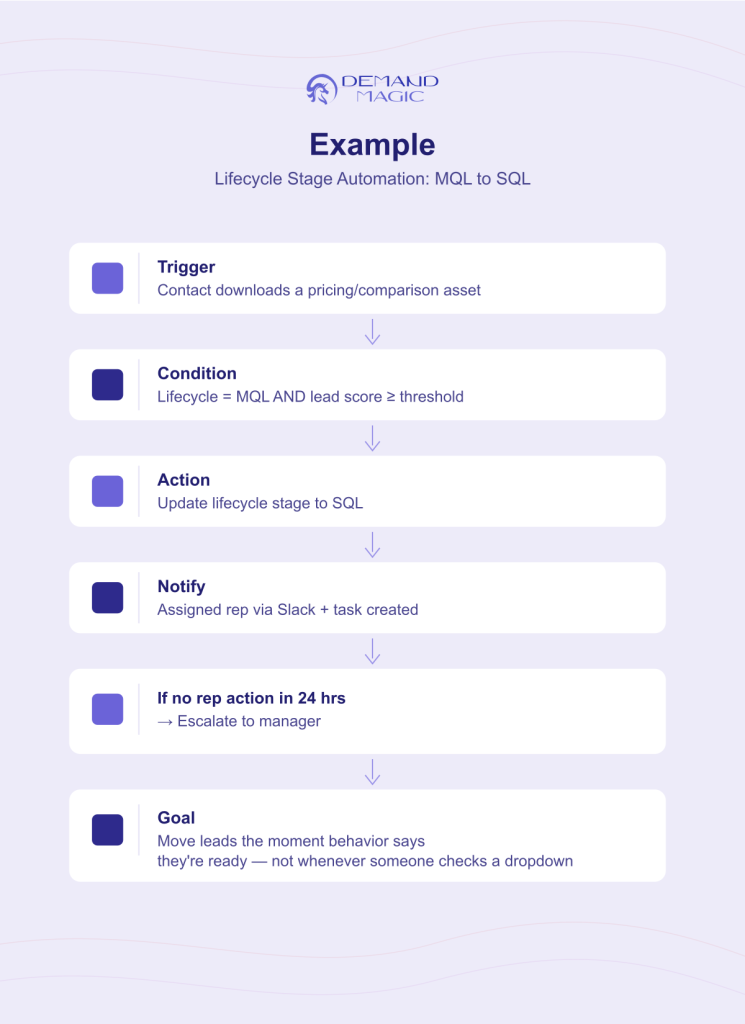
Automatically moves contacts between lifecycle stages based on real behavior, content downloads, page visits, email engagement, form fills, instead of relying on a rep to manually update a dropdown.
It requires actually agreeing, cross-functionally, on what counts as an MQL versus an SQL.
That conversation gets postponed indefinitely, so the workflow never gets built either.
Leads stall in no-man’s-land.
Marketing thinks a lead is “sales-ready” and moves on.
Sales never sees it because nobody updated the stage.
…
Multiply that by every lead in the pipeline and you get a gap where good leads quietly die of neglect – not because anyone dropped the ball, but because no automation was watching the lifecycle stage in the first place.
When stages move automatically, reps stop babysitting dropdowns and start selling.
Salesforce’s 2026 State of Sales report found that 85% of sales reps using AI agents say the automation frees them to focus on higher-value work. That’s time back the moment nobody has to manually flag a stage change.
This isn’t a nice-to-have; it’s what separates the top of the pack.
The same report found high-performing sales teams are 1.7 times more likely to use automation for prospecting than teams whose revenue stalled or declined. Clean lifecycle automation is the same kind of lever.
The gap between average and top-performing teams here is wide. Recent B2B benchmark data puts median MQL-to-SQL conversion at roughly 13%, with top-quartile teams converting more than double that – and clean lifecycle automation is one of the biggest drivers of that gap.
Goal: move leads the moment behavior says they’re ready: not whenever someone remembers to check a dropdown.
The goal was never the form-fill. It was the qualified conversation. Cut out the middle step that’s costing you both.
Stop gating your content. Start gating your calendar: for the qualified buyers who come to you already sold on your thinking.
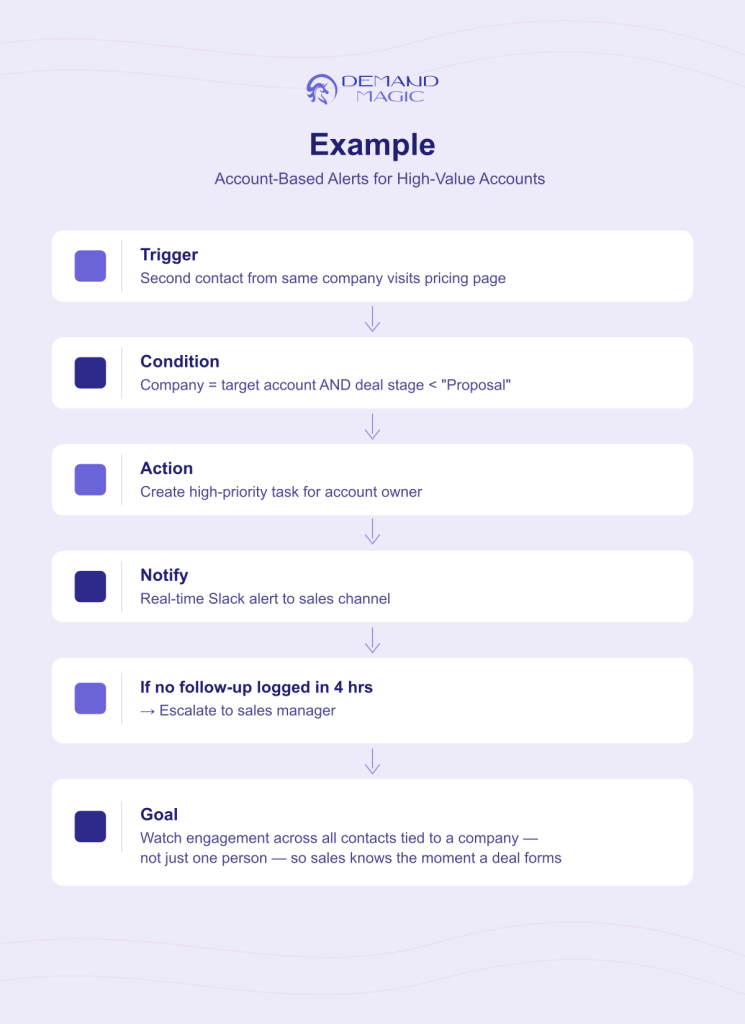
Flags sales in real time when a target account does something meaningful – a decision-maker visits the pricing page, opens three emails in a day, or a second contact from the same company shows up.
Most workflows are built around individual contacts, not accounts. Nobody wires up cross-contact, account-level signals because it takes more setup than a standard trigger.
The single strongest buying signal in B2B, multiple people at one account engaging at once, goes completely unnoticed.
That’s the moment a deal is forming, and most teams find out about it two weeks later in a discovery call, instead of the day it happened.
Catching a second (or third) contact from the same account isn’t a minor detail; it’s catching the buying group as it actually forms.
Forrester’s January 2026 State of Business Buying report found the typical B2B buying decision now involves 13 internal stakeholders and 9 external influencers. One contact was never the whole story!
An account-level workflow is what catches the rest of the room walking in.
This isn’t just about visibility; it changes outcomes.
Salesmotion’s 2026 win rate research found that engaging three or more contacts on a deal produces 2.4x higher close rates, rising to 3.1x for enterprise deals.
Catching that second contact the moment they show up isn’t a nice-to-have signal – it’s the difference between a deal that closes and one that quietly dies with one champion.
Goal: watch for engagement patterns across all contacts tied to a company (not just one person’s activity) so the moment a deal starts forming, sales knows.
None of these workflows are exotic.
They’re not asking for some advanced AI feature HubSpot just launched. They’re basic hygiene that most teams never get around to – because building them requires cross-functional alignment, not just clicking “create workflow.”
This is exactly the gap HubSpot management services are built to close – not just keeping the CRM running, but making sure it’s actually catching the signals your team is paying to generate.
The cost of skipping them doesn’t show up on a dashboard.
It’s the deal that never got flagged, the lead that went cold and stayed cold, the account that was ready and nobody knew. If your HubSpot instance still runs on the workflows you built in year one, there’s a good chance leads are leaking out the sides you’re not watching.
Do these workflows require HubSpot’s more expensive tiers?
Lead re-engagement and lifecycle automation are achievable in most paid tiers. Account-based intent alerts typically need more advanced workflow logic or a connected tool, but the core signal-catching can often be built with what most teams already have.
What’s the difference between lead scoring and lifecycle stage automation?
Lead scoring assigns a number based on fit and behavior. Lifecycle stage automation uses that score (and other triggers) to actually move the contact through defined stages – MQL, SQL, and so on – without a human updating a dropdown. Scoring feeds the automation; it isn’t a replacement for it.
How do we know if leads are already leaking through these gaps?
Pull a sample of contacts marked “MQL” and check how long they’ve sat there without a lifecycle stage change. If a meaningful chunk have been stuck for 60+ days with no next step, that’s a workflow gap, not a lead quality problem.
Should marketing or sales own these workflows?
Neither, exclusively. The workflows that get skipped are usually the ones stuck between departments because nobody owns the handoff. Building them requires marketing and sales to agree on definitions first – the automation itself is the easy part.
DemandMagic manages HubSpot instances for B2B teams who’d rather have their CRM catch these signals automatically than lose them to manual tracking. If it’s been a while since anyone audited your workflows, book a free marketing session and let’s take a look.